
What is a Dynamic QR Code, and How Can You Create and Use It
 By Vall V.
Understanding how dynamic QR codes work starts with how they store and redirect to destination content.
Dynamic QR codes use a redirect link (a short URL) that connects the scan to the actual destination managed through a dynamic QR code generator. This allows the destination to be changed without replacing the printed QR code.
They are useful for menus, packaging, business cards, signage, and marketing campaigns where the linked content may change.
Key takeaways
|
Table of Contents
What is a dynamic QR code?
A dynamic QR code is a type of quick response code that uses a short redirect link to connect users to the exact online content.
It’s also called an editable QR code because the destination can be changed after it's created. You can update the linked content without replacing the printed code.
Depending on the platform, you can create one for different types of data, such as:
- Dynamic URL QR code for different kinds of web links
- PDF and other files
- Digital business cards (vCards)
- App store links
- Multiple link redirections (Smart URL QR codes)
- HTML-based landing pages
- Other specialized QR solutions
Note: The exact capabilities vary across QR code platforms, so a dynamic QR code should not be treated as a universal feature.
How do dynamic QR codes work?
Upon creation, a dynamic QR code generator assigns a shortened redirect URL to the content you choose to share and embeds it in place of the original content.
As a result, you can edit the destination link, unlike with static QR codes, which permanently store the exact content in their modules.
Additionally, because the QR code stores only the shortened redirect URL, the pattern itself is not affected by the destination content's size. This makes it easier for people to scan, provided there are no issues with the printing or the scanning device.
How are static and dynamic QR codes different?
The main difference between static and dynamic QR codes lies in what happens after the QR code is created.
Feature | Static QR code | Dynamic QR code |
Edit QR code content | Not supported | Supported |
QR code analytics | Not supported | Supported |
QR code Tracking | Not supported | Supported |
Expiry | Does not expire | Expires depending on the paid subscription |
Best used for | One-time events and information that doesn’t require updates. | Recurring QR code campaigns that need tracking and scan analytics |
- Edit QR code content: Dynamic QR codes let you edit a QR code even after it has been printed. On the other hand, the content of static QR codes is fixed the moment you generate and download them.
- QR code analytics and tracking: Dynamic QR code tracking provides you with data such as the number of scans, time, location, and device type (possible via the short redirect link). Static QR codes do not offer tracking, since they link directly to the embedded URL.
- Expiry: Static QR codes do not expire unless the code is damaged or its embedded link breaks. Dynamic QR codes may stop working if the service subscription or free trial expires. They can also be intentionally deactivated when a campaign ends, depending on the platform.
Dynamic QR codes work best when teams need to update content or measure engagement, while static QR codes are designed for one-time events and sharing info that doesn’t need updating.
How do you create your own dynamic QR code?
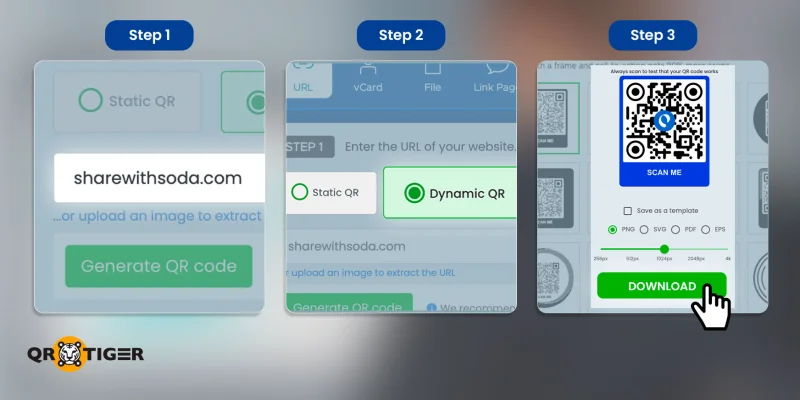
To create a dynamic QR code for your business, here is a step-by-step guide:
1. Look for a dynamic QR code generator online.
2. Select from the list of dynamic QR code solutions the one that best fits your use case.
Note: Depending on the platform, some QR code solutions allow users to create a static or dynamic version. In such cases, select the Dynamic QR code option.
3. Input all of the required information for the QR code and select “Generate QR code”.
4. Customize the QR code’s design by adding your brand logo and a call-to-action (CTA).
5. Test the QR code by scanning it with two different smartphones.
6. Download the QR code and add it to your promotional material.
Read our full guide on how to create free dynamic QR codes and learn about the features available.
Limitations of dynamic QR codes
Dynamic QR codes support features beyond basic linking, such as destination updates and scan tracking. However, these features also depend on the QR code service and its infrastructure.
This means dynamic QR codes can have limitations related to service availability, subscription requirements, and access to certain features.
Reliance on QR code provider
A dynamic QR code relies on a provider's redirect service to send scanners to the correct destination. While the QR code may still scan successfully, it won't reach the intended content if the redirect service is unavailable.
This makes reliability important when using a QR code on long-term materials such as product packaging, equipment labels, signage, and printed documentation.
When choosing the best dynamic QR code generator for your business, check its uptime, account requirements, support options, and policies for maintaining active dynamic QR codes.
Subscription constraints
Many dynamic QR code generators use subscription plans to provide access to advanced features. Depending on the provider, lower-tier or free plans may limit:
- Number of dynamic QR codes
- Monthly or total scans
- Analytics history
- Customization options
- File storage
- Integrations
- Retargeting features
- QR code duration
- Team or account management
This matters when a QR code will be printed in large quantities. Campaigns that start with a small number of scans can potentially grow over time, so check the provider's usage limits and the cost of dynamic QR codes before deployment.
Internet dependency
For those wondering whether a QR code can work without an internet connection, most dynamic QR code solutions require an internet connection to scan because they need to reach the redirect service before loading the final destination.
This can be a limitation at events, trade shows, outdoor locations, transportation areas, or other places where mobile connectivity may be inconsistent.
For offline use cases like Text, Wi-Fi, and SMS QR codes, a static QR code containing the required information may be more appropriate.
Privacy considerations
Dynamic QR platforms also collect information about QR scans, depending on the provider and configuration. Available data may include the scan time, device type, operating system, and approximate location.
That data can be useful for campaign measurement, but businesses should understand what information is collected and how it is processed.
When choosing a QR code platform, review its data retention policies and consent requirements, and ensure it is compliant with the General Data Protection Regulation to protect analytics and audience data.
Read our guide on QR code privacy for more information about how QR TIGER handles scanners and users’ data.
Service continuity
A dynamic QR code can remain printed and readable for years, while the service managing its redirect may change during that period.
This is particularly relevant for packaging, product labels, manuals, permanent signage, and other materials that are expensive or difficult to replace.
Before using a dynamic QR code for a long-term application, review the provider's terms and what happens to your codes if you cancel an account or a service is discontinued.
Best use cases for dynamic QR codes
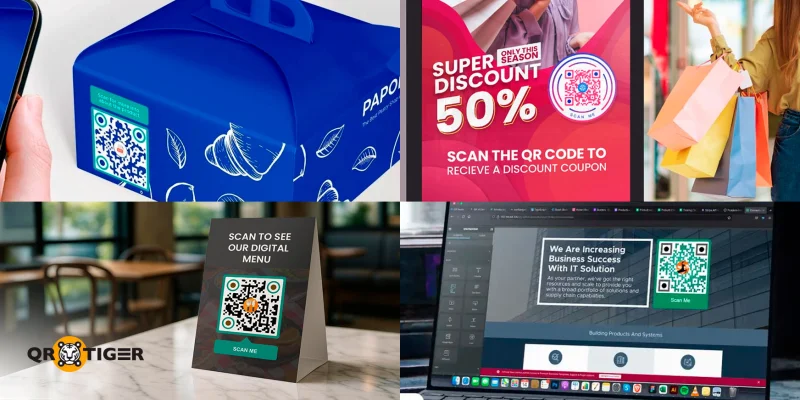
Dynamic QR codes are particularly useful when physical materials connect to information that changes over time.
Here are some examples of dynamic QR code use cases that businesses can benefit from using:
- Product packaging: Allows users to update product information, track products, and add digital resources without changing the printed code.
- Event tickets: A dynamic QR code for events can help organizers manage event destinations or guest information associated with printed or digital tickets.
- Restaurant menus: Using a digital menu QR code, businesses can update the online menu while keeping the same code on tables or printed materials.
- Business cards: Users can update their profile, contact page, or professional information without needing to print or hand out updated business cards.
- Posters and signage: Marketing teams can efficiently update campaign landing pages while keeping existing signage in place, which not only ensures users receive up-to-date information but also increases audience trust in the brand.
- Product documentation: Update manuals, support pages, or digital resources after packaging has been printed.
- Retail displays: Allows retail businesses to change promotions or landing pages without replacing every physical display.

Frequently asked questions about dynamic QR codes
Do dynamic QR codes cost money?
Pricing for dynamic QR codes varies by provider. Platforms like QR TIGER allow users with free accounts to create at least 3 dynamic QR codes without paying for a subscription, while others may offer a free trial to create dynamic QR codes that expire after the trial ends.
How do you test a dynamic QR code before printing?
Scan the final QR design with different smartphones and under different lighting, distances, and angles. Also, verify that the redirect and final landing page work correctly.
What can you track with a dynamic QR code?
Depending on the provider, you can track metrics such as total and unique scans, scan dates, scan times, device types, and scan locations.
How long does a dynamic QR code last?
It depends on the provider and plan. Some services may require an active subscription or impose limits on how long a dynamic QR code remains active.
Do dynamic QR codes require internet access?
Generally, yes for online redirects. The scanner needs internet access to reach the redirect service and then load the destination.
Can you convert a static QR code into a dynamic QR code?
No. A static QR code cannot be converted after it has been created. You need to generate a new dynamic QR code that points to the same destination.
The smart solution to QR code management
Understanding how dynamic QR codes work can make it easier to manage information shared through printed materials.
Rather than replacing a QR code every time the destination link is updated, you can edit the content instead while keeping the same dynamic QR code on your packaging, menus, business cards, signage, or marketing materials.
Depending on the platform, you can also track scans and measure engagement, making it easier to see the impact of your QR code campaigns.
Ready to get started? Create a custom dynamic QR code with QR TIGER and make your campaigns easier to update, manage, and measure.
This article is for general informational purposes only and does not constitute legal, financial, or other professional advice. For questions about QR TIGER's products or services, please contact our support team at [email protected].
Frequently Asked Questions (FAQ)
Do dynamic QR codes cost money?
How do you test a dynamic QR code before printing?
What can you track with a dynamic QR code?
How long does a dynamic QR code last?
Do dynamic QR codes require internet access?
Was this article helpful?
Maximize Scans with the Best QR Code Generator
Join thousands of global brands using QR TIGER to manage dynamic routing, bulk creation, and deep attribution analytics.
Get Started For Free
