
Google Form에 대한 QR 코드를 만드는 방법: 스캔 및 응답 수집
 에 의해 Vall V.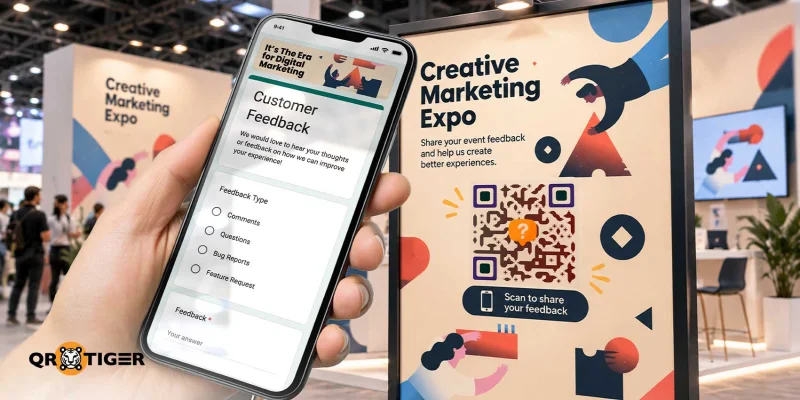
목차
Google Form에 대한 QR 코드를 만드는 방법: 단계별 안내서

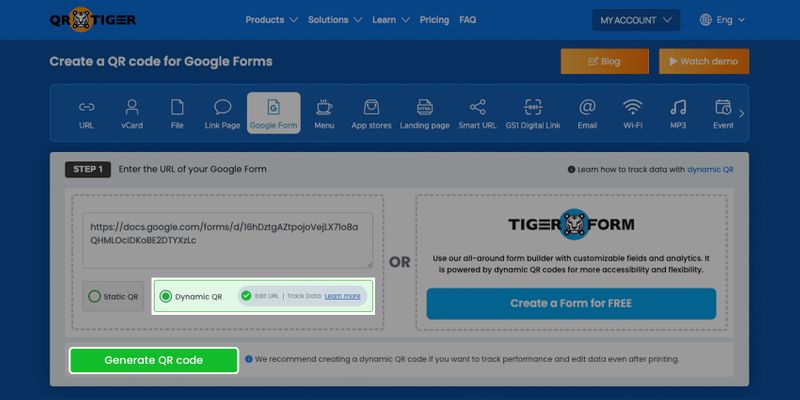
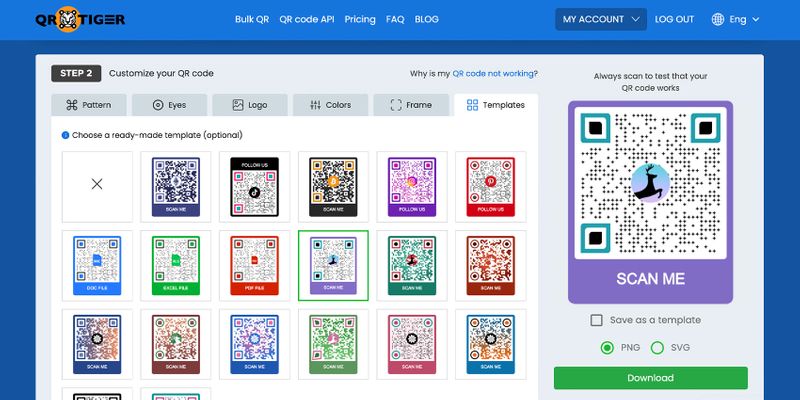
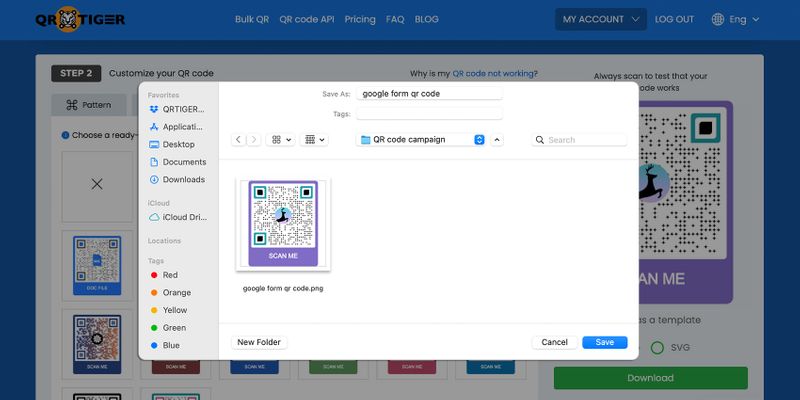
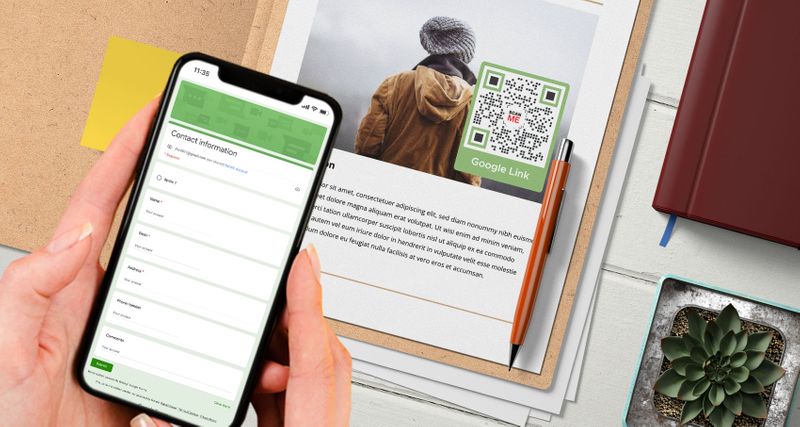
Google Forms QR 코드는 무엇이며 어떻게 작동합니까? 구글 폼을 QR 코드로 변환하는 솔루션이며 링크를 공유하는 대신 코드를 스캔하면 사용자가 폼으로 쉽게 이동할 수 있습니다.
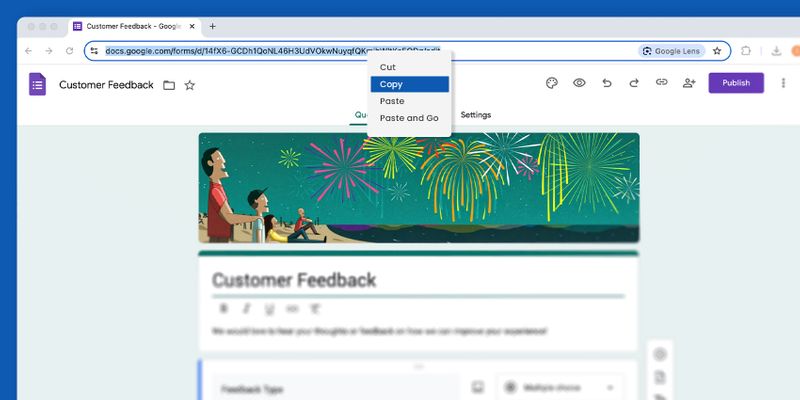
먼저 Google Forms 플랫폼에서 작성된 Google Form을 만들어 QR 코드로 변환해야 합니다.
Google 계정에 로그인하고 오른쪽 상단 모서리의 메뉴에서 Forms를 선택하세요. 그런 다음 원하는 템플릿을 사용하여 하나를 만드세요.
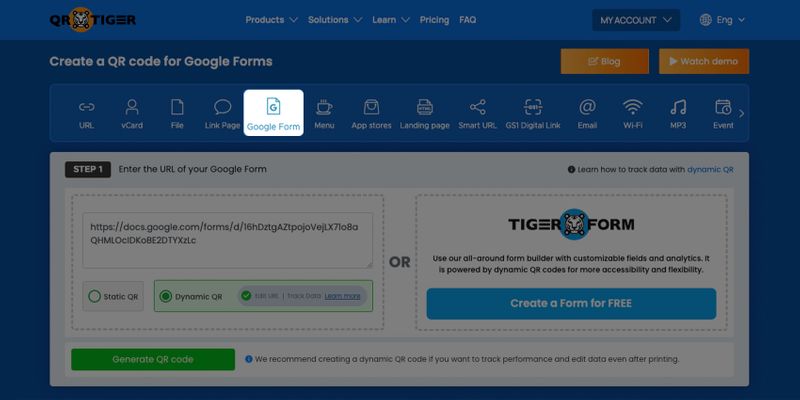
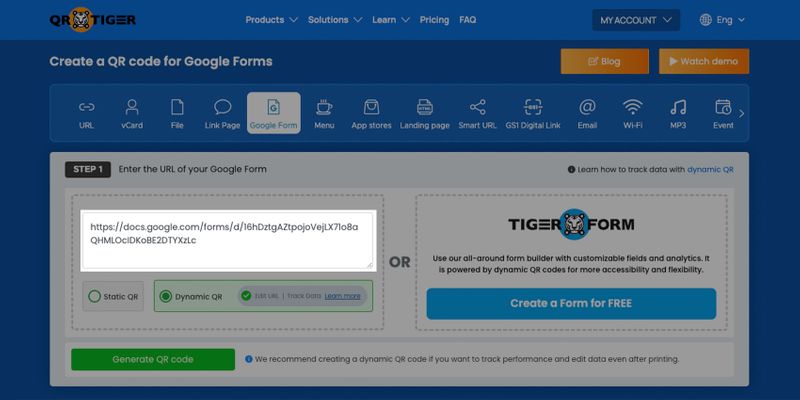
Google Form을 만들면, 당신은 생성할 수 있습니다. Google Form용 QR 코드 온라인. 공유 가능한 구글 폼 링크를 QR 코드 소프트웨어에 복사하여 생성, 사용자 정의하고 코드를 다운로드하세요.
Google Forms용 QR 코드를 스캔하면 양식이 사용자의 스마트폰 화면에 자동으로 표시됩니다. 이를 통해 사용자들이 등록 양식, 설문 양식 등을 쉽게 작성할 수 있습니다.
구글 서비스를 사용하여 워크플로우를 개선하는 데 도움이 되는 다양한 방법이 있습니다. 구글 폼 이외에도 QR 코드를 사용할 수 있습니다. Google 슬라이드 QR 코드 프레젠테이션을 즉시 공유하세요.
동적 구글 폼 QR 코드가 더 좋은 이유
정적 QR 코드는 QR 코드의 저장된 Google Forms 링크를 변경하거나 수정할 수 없습니다.
다른 한편에는 동적 QR 코드 QR 코드 내에 저장된 링크를 새 링크로 변경하여 스캐너를 다른 온라인 작성 양식으로 리디렉션할 수 있습니다.
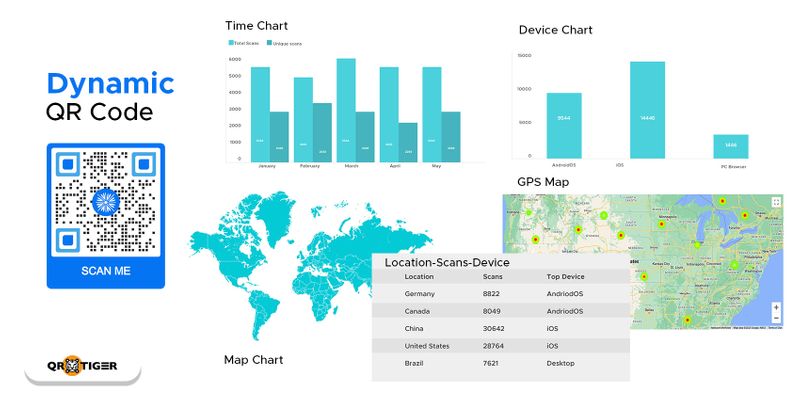
Google Forms에 대한 QR 코드를 동적 모드로 생성하면, 새로운 QR 코드를 만들거나 인쇄하지 않고 Google Forms의 QR 코드를 쉽게 편집할 수 있습니다.
이는 연간에 다양한 종류의 설문 조사를 시행하는 경우 유용한 QR 코드를 재사용할 수 있다는 것을 의미합니다.
조사나 이벤트 등록 기간에 따라 만료되도록 설정할 수도 있습니다. 또한 QR 코드를 스캔했지만 작업을 완료하지 않은 이전 방문자들을 다시 대상으로 삼아 조사, 이벤트 또는 비즈니스 리뷰와 관련된 광고를 보여줌으로써 재타겟팅할 수도 있습니다.
또한, 마케팅 목적으로 QR 코드를 사용하는 경우 QR 코드 분석 스캔을 추적하고 대상 시장의 행동을 이해할 수도 있습니다.
더 많은 고급 기능을 동적 QR 코드로 잠금 해제할 수도 있습니다. 그래서 동적 및 통합된 QR 코드 생성기 및 Google Form 제작기를 사용하는 방법을 배우는 것이 좋습니다.
당신은 심지어 만들 수 있습니다 Google 문서 QR 코드당신의 중요한 문서 파일을 위해.
코로나19 대유행 시기의 비접촉 등록
COVID-19 대유행 기간 중 특히 접촉 없는 등록 양식의 등장이 나타났다.
등록뿐만 아니라 프로세스에서도 특히 결제 방법에 있어서도. 정부는 기업들에게 강제로 시행하도록 합니다. 접촉 없는 결제 운영을 계속하기 위한 시스템
정부와 민간 부문을 포함한 모든 사람들이 질병 감염을 피하기 위해 할 수 있는 모든 예방 조치를 취하기 위해 노력하고 있습니다.
또한 레스토랑 산업은 고객들에게 안전하게 서비스하기 위해 상호작용하는 레스토랑 메뉴 QR 코드 소프트웨어를 사용하여 시설 내에서 무접촉 거래를 이용하고 있다.
The 메뉴 QR 코드 고객이 필요한 정보를 기입하면 접촉 추적 목적으로 고객 세부 정보도 검색할 수 있습니다.
이제 이는 사회적 거리두기 수단뿐만 아니라, QR 코드를 활용한 전자 결제 및 접촉 없는 등록 양식과 같은 접촉 없는 상호 작용을 통해서도 이루어집니다.
QR 코드를 사용하여 비물리적 상호작용을 할 수 있음으로써 직접 접촉과 물질적 물체를 통해 전파될 수 있는 바이러스와 싸울 수 있습니다.
표준 양식 대신 디지털 채워 넣기 양식을 QR 코드를 사용하여 대체할 수 있습니다. 이를 터치하지 않고 스마트폰만 사용하여 완료할 수 있습니다.
Gmail QR 코드를 사용하여 더 빠른 거래를 위해 즉시 이메일을 보낼 수도 있습니다. QR 코드를 스캔하려면 단순히 사용하면 됩니다. 스마트폰 사진 모드나 QR 코드 리더 앱에서, 모든 연령대의 사람들이 편리하게 액세스할 수 있도록 만들어졌습니다.
모두를 종합하면, 해야 할 일은 구글 폼용 QR 코드를 스캔하여 스마트폰에 표시된 필요한 데이터로 양식을 작성하고 제출 버튼을 클릭하는 것뿐입니다.
마을 최고의 QR 코드 생성기로 디지털 및 무접촉으로 전환하세요
Google Forms에 대한 QR 코드를 만드는 것은 편리하고 효율적으로 정확한 정보를 수집하는 좋은 방법입니다.
양식을 수동으로 작성하는 것을 최소화할 뿐만 아니라 연락을 줄이고 프로세스를 더 빠르게 만듭니다.
스마트폰 장치만 사용하여 사람들로부터 데이터나 정보를 수집하는 편리한 방법이기도 합니다.
저장된 Google Form 링크를 새 데이터로 변경할 수 있습니다. 새로운 QR 코드를 생성하지 않고도 변경할 수 있습니다.
Google 양식을 QR 코드로 변환하는 방법을 알았으니, 신뢰할 수 있는 온라인 QR 코드 생성기를 사용하여 하나를 생성할 수 있습니다.
QR TIGER를 사용하여 Google Forms용 QR 코드를 생성하면 품질과 효율성을 보장할 수 있습니다. 오늘 가입하여 프로세스를 디지턀화하세요.

자주 묻는 질문
Google Forms에 QR 코드를 왜 사용하나요?
Google Forms를 공유하기 위해 QR 코드를 사용하는 많은 이유가 실제로 있으며, 모두 이점을 가지고 있습니다. 여기에 그 중 일부가 있습니다:
- 쉬운 링크 공유: 포스터나 전단지와 같은 인쇄물에 QR 코드를 통합하여 Google Forms를 오프라인으로 공유하면 긴 URL을 공유하는 번거로움을 피할 수 있습니다.
- 빠른 양식 접근: 스마트폰으로 QR 코드를 스캔하면 즉시 양식이 열리며, 설문 조사 작성이나 데이터 수집 과정을 간소화할 수 있습니다.
- 모바일 친화적 전 세계 수십억 명의 스마트폰 사용자가 있기 때문에 QR 코드는 모바일 중심 접근 방식을 채택하는 원활한 방법으로 널리 접근성을 보장합니다.
- 편의성: 전통적인 종이 설문지를 QR 코드로 대체하여 온라인 양식 작성을 더 빠르고 쉽고 접근성이 높게 만드세요.
Google Form QR 코드의 장점은 무엇인가요?
A Google Form QR 코드 다양한 솔루션을 제공하여 프로세스를 간소화하고 사용자 경험을 향상시키는 것입니다. 주요 이점은 다음과 같습니다:
- 격려하는 피드백: QR 코드를 사용하면 고객이 양식에 접근하고 리뷰를 제공하며 통찰을 공유하기 쉬워져서 기업이 서비스와 전략을 개선하는 데 도움이 됩니다.
- 효율적인 설문조사: 대상 응답자는 빠른 스캔으로 온라인 설문 조사에 쉽게 접속할 수 있어 응답률과 편의성이 향상됩니다.
- 효율적인 이벤트 등록: 참석자는 QR 코드를 스캔하여 사전 등록할 수 있으며, 줄을 줄이고 오류를 최소화할 수 있습니다.
- 간편한 체크인: 호텔은 QR 코드를 사용하여 원활한 게스트 체크인을 할 수 있으며 만족도를 향상시키고 효율성을 향상시킬 수 있습니다.
- 쉬운 예약: QR 코드는 수동 예약 시스템을 대체하여 예약과 예약을 관리하는 번거로움 없는 디지털 방식을 제공합니다.
Google Form을 어떻게 만들까요?
Google Form을 만들려면 Google 계정에 로그인하세요. 로그인한 후에 오른쪽 상단의 사탕 상자 버튼을 클릭하세요. 아래로 스크롤하여 Forms를 클릭하세요. 깔끔한 템플릿이나 미리 디자인된 템플릿을 사용할 수 있습니다.

이 문서는 일반 정보 목적으로만 제공되며 법적, 금융적 또는 다른 전문적인 조언으로 간주되지 않습니다. QR TIGER 제품 또는 서비스에 관한 질문이 있으시면 지원팀에게 [email protected]으로 문의하십시오.
자주 묻는 질문 (FAQ)
What is a Google Form QR code?
Can I make a QR code for an existing Google Form?
Can I edit a Google Form after creating its QR code?
Does a Google Form link QR code expire?
Do people need a Google account to answer a Google Form?
이 기사가 도움이 되었습니까?
최고의 QR 코드 생성기로 스캔을 최대화하세요.
수천 개의 글로벌 브랜드가 동적 라우팅, 대량 생성 및 심층 속성 분석을 관리하는 데 QR TIGER을 사용하고 있습니다.
무료로 시작하기
